

InSpectre is a small, free Windows utility from Steve Gibson (GRC) that lets you easily check whether your PC is protected against the Meltdown and Spectre processor vulnerabilities.
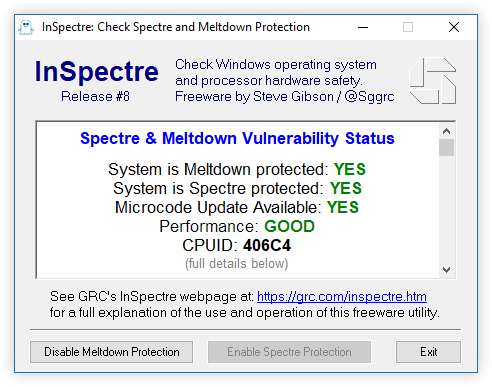
It quickly shows:
- If your operating system has the necessary patches
- Whether your CPU’s microcode is updated
- If protections are enabled or disabled
- Any performance impact you might be experiencing
The program is super lightweight (no installation needed) and clearly tells you in plain English if your system is safe or still vulnerable. It also includes a silent “probe” mode for scripting.
Perfect for quickly understanding your system’s security status against those famous 2018 CPU attacks.
| Category | Details (checked March 2026) |
|---|---|
| Program Name | inSpectre |
| Developer | Steve Gibson / Gibson Research Corporation (GRC) |
| Version | 1.0 — released January 2018 |
| License | Freeware |
| File Size | ≈115 KB |
| Platform | Windows only (works from Windows XP through Windows 11, results vary by system) |
| Purpose | Detects exposure to the original Meltdown & Spectre vulnerabilities and confirms if OS and hardware mitigations are active |
| Primary Functions | • Detects Meltdown (CVE-2017-5754) • Detects Spectre v1 (CVE-2017-5753) & v2 (CVE-2017-5715) • Checks Windows protections and CPU microcode status • Shows estimated performance impact |
| Install | Portable EXE — no installation needed, just run it |
| Key Features | • Lightning-fast scan with color-coded results • Completely offline (no internet, no telemetry) ✅ • Super lightweight and digitally signed |
| Performance Impact | Displays possible slowdowns; real-world impact usually ranges from 0–30% depending on your workload and patches |
| Official Site | https://www.grc.com/inspectre.htm (best place for download and full docs) |
| Advantages | Free, quick, easy to understand, zero telemetry, made by a well-known and trusted developer |
| Limitations | Windows-only, only covers the original Meltdown/Spectre variants, no automatic updates |
Share this